TalkToAi Code brings project files, conversations and development tools into one desktop workspace. Choose a model route that suits your setup, inspect the work, and keep your project under your control.
The GitHub release page is the source for current version, downloads, setup instructions and checksums. Microsoft Store status is separate; this page does not imply that a Store edition is published.
Open-source applicationLocal or self-hosted AI optionsProject-first workflowReview changes before release
Useful work before you connect a model
Open a folder. Get your bearings.
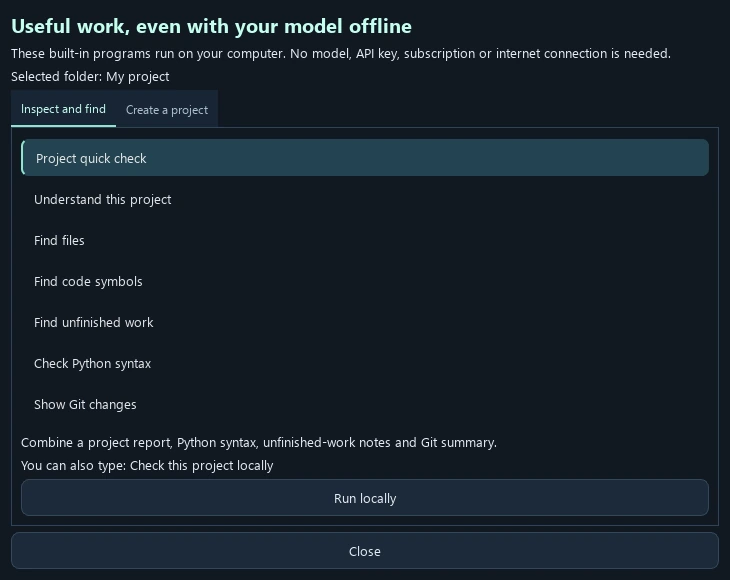
The current documented Local tools can inspect a project without a model, API key or network request. Start with a report you can read, then connect AI when you want custom coding or conversation.
Choose your project folder.
Open Local tools → Project quick check for an orientation report, Python syntax findings, TODO comments and Git change names.
Try a focused request such as “What is in this project?”, “Find files matching *.gd” or “Show TODOs”.
For a custom change, configure a supported model route, give a small task and review the resulting files and evidence.
Actual Local tools interface from the project's documented 8.3 workflow, captured with a disposable profile. Appearance and available tools depend on your installed version.
Local reports are bounded. Python syntax inspection parses files without importing them; it does not run project tests or establish that a program works.
Bring relevant context. Keep a readable record.
Attach text and documents
The documented 8.4 text attachment route accepts up to five text, code, CSV, JSON or selectable-text PDF files per message. It limits each file to 2 MB and 12,000 extracted characters, with 20,000 characters total. Truncation is labelled; scanned PDFs and images are outside this text route.
Review what you send
Extracted attachment text becomes part of the message sent to your chosen model route and is saved in local task history. Check the selected provider and the file contents before Send.
Take the conversation with you
Conversation → Copy conversation or Export conversation gives a readable Markdown transcript of visible messages. Tool activity and technical evidence remain in the task report.
Feature details above follow the project's current documentation. Check your installed edition and release notes for availability.
8.5 update prepared for Microsoft Store certification
Your private API vault. More ways to keep working.
The prepared 8.5 desktop update adds API profile routing with private operating-system credential storage. Configure your own provider keys and exact model IDs, then opt in to alternative profiles marked free or self-hosted. If a provider reports a rate or quota limit, the app can use an enabled alternative and shows the switch.
Free allowances depend on your provider account and can change. No monthly token allowance, unlimited use or free billing is guaranteed. Fallback sends task context to the alternative provider you enabled; review each provider's terms. The local Auto route remains separate from API fallback.
Computer assistance adds bounded scrolling in observed Windows accessibility controls and practical keyboard navigation, with stale-window checks and cancellation. File attachments, conversation export, optional Gmail reading and project tools remain available. The update removes legacy hosted account and mail integrations.
8.5 is prepared for Store submission and certification. Check the Microsoft Store and GitHub links for the versions actually available; this page does not announce an 8.5 public release.
Keep ordinary conversations and project tasks organised, with files and context close to the work they belong to.
Use a model you choose
Connect a local model, a server you control or an optional API provider. Each provider has its own hardware needs, limits and terms.
See and review the result
Inspect the project changes and available checks as work proceeds. Treat generated code as a proposal to review, build and run.
Pick up your workflow
Read the current release notes and setup guide for supported features, platform requirements and the latest changes.
TalkToAi Code is an independent project. This page links directly to its public repository so release information stays current without a separate paid server or database.